What are True Peaks?
Introduction
You’re probably already familiar with peak meters. They’re built into every DAW, and they help you see when your mix is clipping. “Clipping” happens when your mix is too loud—the music’s volume gets pushed past its limit, and the loudest parts are chopped off. This reduces the dynamic range and causes distortion.
Peak meters are designed to show you when your music is about to clip. But in reality, regular peak meters aren’t always accurate. They can miss some peaks that appear when your digital music is turned into actual sound.
That’s where true peak meters come in. True peak meters show every peak, even the ones that only show up when your music is played back as audio. Whenever you’re checking your mixes and masters for unwanted peaks, you should always use a true peak meter.
What are True Peaks?
DAWs measure volume using what’s known as a sample peak program meter. The meters we see in our digital mixers show us values in dBFS, and the highest level possible in a digital system is 0dBFS. Common sense tells us that as long as we keep our maximum levels at or below 0dBFS, we can avoid clipping, which causes audible distortion and other unpleasant artifacts in our recordings. In reality, though, it’s more complicated than that.
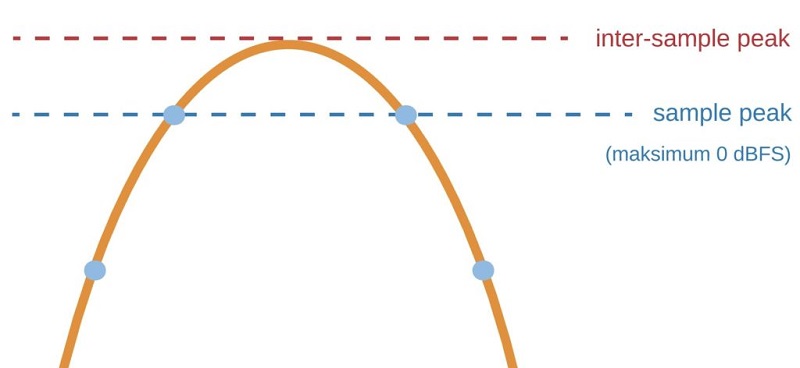
Digital recording takes an analog signal and converts it into a digital one that’s stored on the computer. It captures thousands of samples per second, determined by the sample rate, to recreate the analog signal. The dBFS meters in the DAW measure the peak values of these samples as they exist in the digital realm. However, they don’t show us the true peak values.
During the D/A conversion process, when a digital signal is turned back into an analog one for playback, there can be slight changes in level. The analog reconstruction of the signal can actually peak above the maximum digital sample value. When this happens, it’s called a true peak or an inter-sample peak.
Standard meters and limiters don’t detect true peaks, so audio that exceeds 0dBFS could end up in your finished mixes. In the studio, listening back through decent converters, you might not notice it. But once the file leaves the DAW and is played on someone else’s system, digital clipping may become obvious. This problem gets even worse when converting mixes to lossy formats like MP3.
What is Loudness?
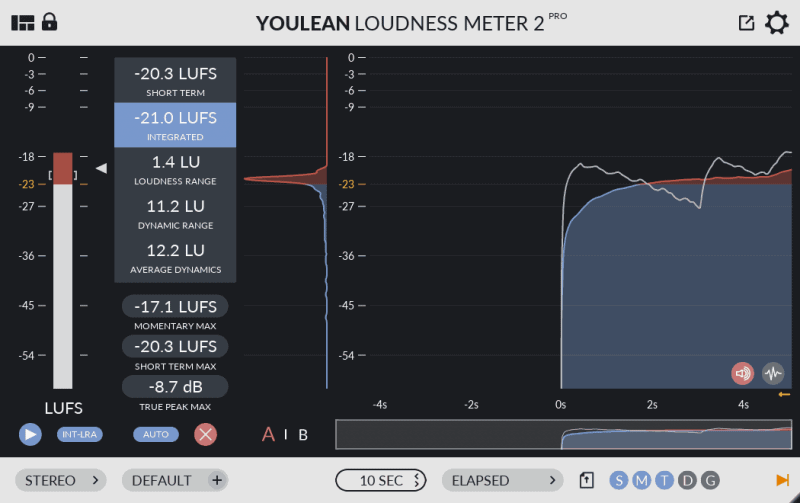
Loudness—more accurately called “perceived” or “apparent” loudness—is measured in LUFS (also known as LKFS), and is always calculated over a period of time. LUFS uses the same relative scale as decibels.
The loudness of an entire program or song is called integrated loudness. Most of the time, when we talk about “loudness,” we mean integrated loudness. There’s also short-term loudness, momentary loudness, and LRA (loudness range), but those are less important—so for this blog, you can assume we’re referring to integrated loudness!
The ITU BS.1770 recommendation is the international standard for measuring loudness and forms the basis for ATSC A/85 (used for television in the USA), EBU R-128 (used in most of Europe), and various other loudness specifications.
BS.1770 takes into account things like the acoustic effects of the human head, so different frequency ranges are weighted differently. The latest ITU revision is BS.1770-4, but earlier versions are still used in some cases—for example, parts of Netflix’s loudness specifications refer to BS.1770-1.
How are they connected?
A common misconception is that loudness and True Peak are dependent on each other, but that’s not actually true. For example, a piece of audio might have a maximum True Peak measurement well below the specified limit, yet its integrated loudness could be several LKFS above the target. On the flip side, another audio file with the exact same integrated loudness might have a much higher maximum True Peak value.
The main reason for this is that True Peak is an absolute ceiling, while integrated loudness is an average measured over the entire track or program. If your True Peak level goes above the target value even once—at any point—then the maximum True Peak for your whole project will be above spec.
However, you might have several sections that, if measured separately, are “louder” than the target value, without the overall average going above the specified limit.
True Peak Limiter
Most meters and limiters only show us sample peaks—that is, the highest value of the digital samples that make up the recorded analog signal. These don’t account for true peak values that can occur when the digital signal is converted back to analog.
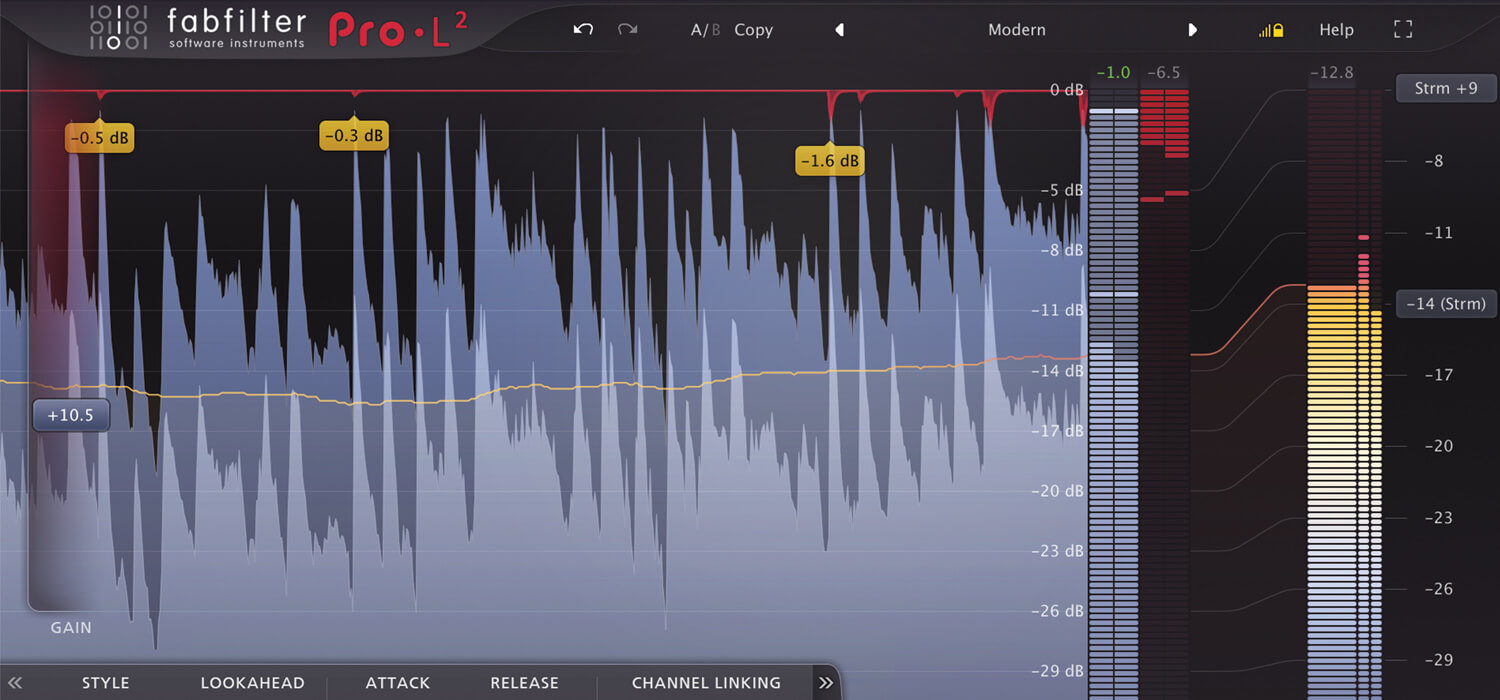
The simplest way to avoid inter-sample clipping caused by D/A conversion is to use true peak meters and/or true peak limiters. A true peak meter can show us inter-sample peak values, while a true peak limiter can catch these and ensure they don’t clip. Loudness specifications for post-production and broadcast usually require that the program is mixed to true peak levels, not just sample peak levels.
In music, loudness requirements are less strict. However, it’s still a good idea to understand true peak levels and how they can affect your mix, depending on where it will be played. Some people argue that inter-sample peaks are almost unnoticeable. Because of the so-called “loudness wars,” some big hits are mastered between +1 and +3 dBTP (decibels true peak).
True Peak when Mastering
When mastering audio, it’s common practice to set the limiter at 0dBFS and push the track hard into it. The goal is usually to make the song as LOUD as possible to compete with other very loud tracks on the charts.
However, this approach will often cause the audio to clip on many playback systems because of digital-to-analog conversion. Most chart hits during the ‘Loudness Wars’ era actually had real peaks around +1dBTP (decibels true peak), and sometimes even up to +3dBTP—which causes a lot of distortion.
Some people argue that these inter-sample peaks are so subtle that they’re not worth worrying about. Still, inter-sample peaks do cause distortion in the audio we hear. Wouldn’t it be better to master audio with a slightly lower peak and simply avoid this distortion? A good true peak meter will give you an accurate reading of your audio’s peak level. By mastering to 0dBTP, you’ll give your listeners the best possible listening experience.
Frequently Asked Questions
What exactly are true peaks, and how do they differ from sample peaks?
So, what’re true peaks, and why should you care about them? True peaks represent the actual maximum amplitude of your audio waveform, not just the highest digital sample values.
Standard peak measurement techniques only capture sample peaks, missing inter-sample overs that can distort playback. If you’re pushing boundaries with limiter settings and maximizing dynamic range, ignoring true peaks could sabotage your results.
Unlike sample peaks, true peaks account for waveform reconstruction between samples, ensuring you avoid clipping on consumer devices. Embracing true peak analysis lets you deliver pristine, innovative audio that translates perfectly across modern playback systems.
Why do true peaks exceed my limiter’s ceiling even when true peak mode is enabled?
Even with true peak mode enabled on your limiter, you might notice that your audio occasionally exceeds the set ceiling. This happens because digital limiters, even with true peak detection, can’t always predict inter-sample peaks that emerge during digital-to-analog conversion.
Your dynamic range and the chosen compression techniques directly influence how aggressively transients are controlled. Some limiters react slower or interpret true peaks differently, especially when comparing analog vs digital workflows—analog gear naturally smooths peaks, while digital processing can reveal hidden overs.
To innovate, refine your processing chain and experiment with different tools to achieve more precise peak control.
How important is controlling true peaks – do they really cause audible distortion?
While limiters sometimes let peaks slip through, you might wonder if those elusive true peaks actually matter. In innovative audio production, controlling true peaks is essential—especially when your music hits various playback systems.
Poor equipment calibration can make those peaks translate into harsh distortion, even if you don’t hear issues in your studio. Psychoacoustic effects come into play too: some listeners perceive subtle digital clipping as unpleasant, even if it’s technically minor.
Unlike analog gear’s gentle saturation, digital overages introduce abrupt, unnatural artifacts. Bridging the analog vs digital gap means respecting true peaks if you want your music to sound pristine everywhere.
Should I aim for true peaks at -1 dBTP, 0 dBTP, or something else in mastering?
Although it might seem tempting to push your true peaks right up to 0 dBTP for maximum loudness, most mastering engineers recommend aiming lower—typically around -1 dBTP.
By doing this, you safeguard your music against digital clipping, which can easily sneak in during conversion or playback. Keeping true peaks at -1 dBTP also preserves your dynamic range, letting transients breathe instead of crushing them for artificial loudness.
Plus, loudness normalization algorithms often adjust overall volume, so chasing 0 dBTP doesn’t guarantee a louder result.
Embrace innovation—master with intention, and let your music sound clean, dynamic, and future-proof.
Why do true peaks matter for streaming platforms like Spotify or consumer playback?
Because streaming services like Spotify use loudness normalization and various codecs for playback, true peaks matter more than ever. When your track exceeds safe true peak levels, audio compression algorithms can introduce unwanted distortion and artifacts during playback. This compromises your intended dynamic range and clarity, making innovative mixes sound harsh or clipped to listeners.
Since loudness normalization reduces the overall volume of louder tracks, it’s vital to guarantee your music doesn’t breach true peak limits. By managing true peaks, you’ll guarantee pristine audio quality and a consistent listening experience, no matter how or where your audience streams your work.
How can inter-sample peaks sneak up and create true peaks up to +3 dBTP?
Even if your mix appears safe on your meters, hidden dangers can lurk between the digital samples. Standard peak measurement tools only catch the highest sample values, not what happens in between.
When your audio gets reconstructed into analog, those in-between points—inter-sample peaks—can actually exceed 0 dBFS, sometimes reaching up to +3 dBTP. This can cause digital clipping, wrecking your carefully crafted audio fidelity.
You might think you’re in the clear, but if you don’t account for these invisible peaks, your innovative mix can distort during playback, especially on streaming platforms that demand pristine, uncompromised sound quality.
Do true peak limiters always sound worse or add unwanted distortion?
While it’s true that true peak limiters have a reputation for adding unwanted distortion, the results depend heavily on how you use them and which plugin you choose. If you push for maximum loudness normalization without regard for dynamic range, digital clipping or distortion may occur—especially with lower-quality limiters.
However, modern true peak limiters offer transparent processing if you set them thoughtfully. You can maintain punch and clarity by carefully balancing input gain, release times, and ceiling values.
For innovative producers, the right limiter can prevent digital clipping without sacrificing your dynamic range or sonic integrity, so choose wisely and experiment.
What’s the best way to measure true peaks accurately without false readings?
Although measuring true peaks might seem straightforward, you’ll need the right tools and settings to avoid misleading results. Traditional analog meters can’t reveal inter-sample peaks that digital algorithms can detect, so you shouldn’t rely on them alone.
Instead, use a true peak meter equipped with advanced digital algorithms—these analyze the reconstructed analog waveform, not just digital sample values. Set the meter to at least 4x oversampling for greater accuracy.
Can limiting for true peaks make my master quieter or lose loudness?
So, can limiting for true peaks actually reduce your track’s perceived loudness? Yes, it can—but there’s more to it.
When you limit for true peaks, you might notice a slight drop in overall level, since inter-sample peaks are kept under control. However, this process can actually preserve your dynamic range and prevent harsh distortion that compromises frequency response.
With careful limiting, you’re not just chasing volume—you’re enhancing clarity and protecting stereo imaging. True peak limiting encourages innovative mastering by balancing loudness with sonic quality, ensuring your music translates well across all platforms without unwanted digital artifacts.
Are true peaks overrated—should I just focus on what sounds best?
Even if your ears tell you a mix sounds great, ignoring true peaks can create problems down the line. Streaming platforms and digital distribution rely on loudness normalization, so hidden inter-sample peaks can push your audio into unwanted clipping distortion, even if you don’t hear it in your studio.
By acknowledging true peaks, you protect your dynamic range from digital artifacts and guarantee your music translates cleanly everywhere.
Chasing what “sounds best” in your room is important, but innovative creators know that balancing technical precision with sonic preference is key. Don’t let overlooked true peaks sabotage your carefully crafted sound.
Conclusion
When you use normalization for digital recording, don’t push it to the limit. Any audio editor allows you to normalize, but you’re taking unnecessary risks if you set the peak all the way to full scale, leaving the new peak at 0dBFS so that the highest sample is right at the edge.
The best advice is to stay a bit lower when normalizing, even if it’s just by one decibel. Now we understand one of the reasons why. When the normalization tool asks you to set the new peak value to 0dBFS—even if it sounds tempting—you should always leave a little headroom.