Hercules Djcontrol Inpulse T7
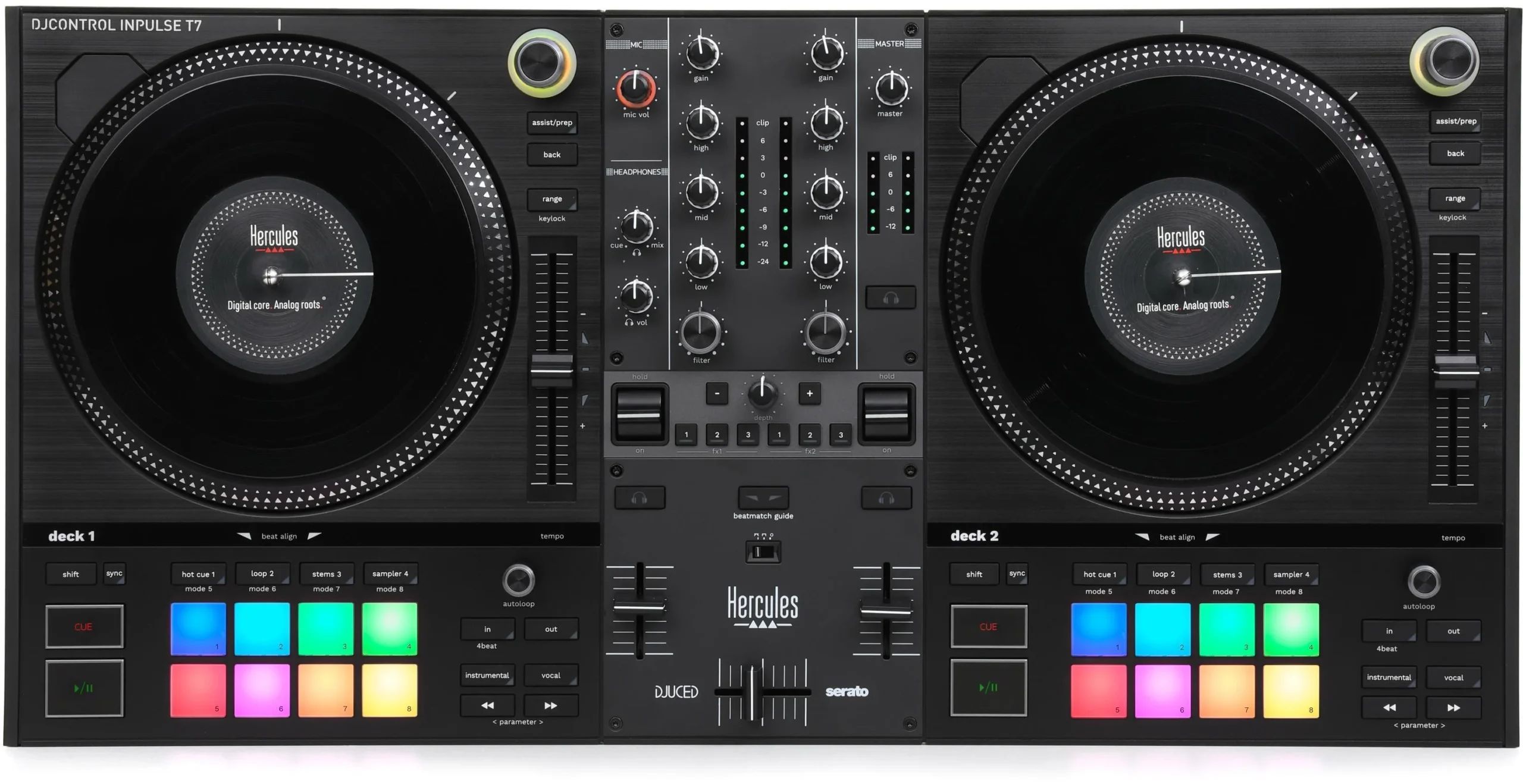
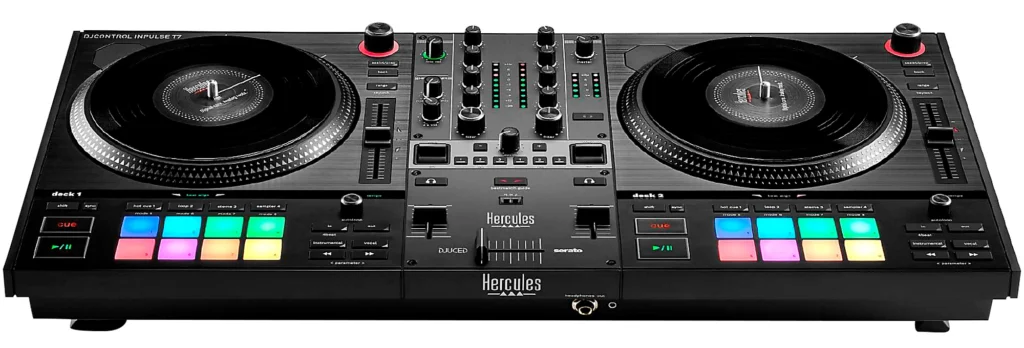
- With two motorised 7″ turntables
When we evaluate the Hercules DJControl Inpulse T7, we’re immediately struck by its combination of motorized platters and intuitive controls, features rarely seen at this price point. Compared to other entry-level controllers, it offers a tactile, vinyl-inspired experience that appeals to both beginners and seasoned users. Yet, it’s not just about feel—its integration with Serato DJ and robust build raise important questions about real-world performance and long-term value that deserve a closer look.

Key Takeaways
- The Inpulse T7 features motorized platters, delivering a vinyl-like tactile experience rare at its price point.
- Seamless integration with Serato DJ Lite and Pro ensures quick setup and smooth performance.
- Performance pads enable hot cues, loops, and effects for creative mixing flexibility.
- The controller’s compact, solid build is portable and durable for regular gig use.
- Tight jog wheel response and low latency make it ideal for precise scratching and beatmatching.
Overview and Key Features of Hercules DJControl Inpulse T7 Review
While many entry-level DJ controllers struggle to balance affordability with professional features, the Hercules DJControl Inpulse T7 stands out by offering motorized platters, high-resolution jog wheels, and advanced performance pads in a compact form factor.
When we compare the Hercules DJControl Inpulse T7 to its competitors, it’s clear that the inclusion of motorized platters—rare in this price segment—brings a tactile, vinyl-like experience that appeals to both aspiring turntablists and digital DJs.
The controller’s layout is intuitive, with performance pads that support hot cues, loops, and effects, enhancing creative flexibility.
Integration with major DJ software ensures seamless workflow.
For those of us seeking innovation without compromising portability or build quality, the Hercules DJControl Inpulse T7 offers a compelling, forward-thinking solution.
Performance, Sound Quality, and Mixing Capabilities — Hercules DJControl Inpulse T7 Review
Given the T7’s motorized platters and responsive jog wheels, we immediately notice a level of performance fidelity that’s uncommon among controllers in this class. The djcontrol inpulse t7 delivers tactile feedback that closely mimics traditional vinyl, letting us execute precise scratch routines and pitch bends with remarkable accuracy.
When compared to other mixing consoles in its price bracket, the T7 stands out for its ultra-low latency and tight platter response, enabling fluid beatmatching and creative passage.
Sound quality is another area where the T7 impresses. Its audio interface produces clean, dynamic output with minimal distortion, maintaining clarity even at high gain levels.
The EQs and filter controls are responsive, allowing for nuanced mixing techniques. Overall, the T7 elevates performance standards for innovative DJs.
Build, Layout, Software Integration, and User Experience with the Hercules DJControl Inpulse T7
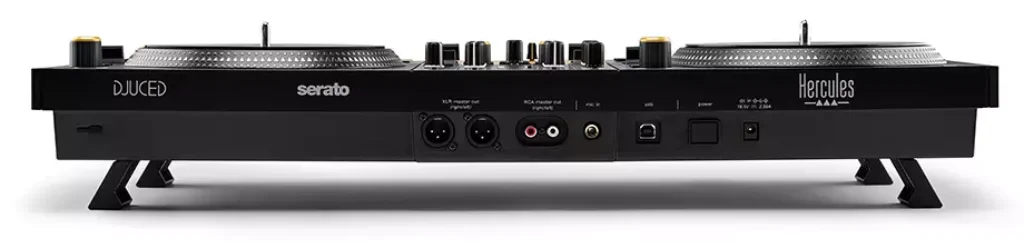
Even at first glance, the Hercules DJControl Inpulse T7’s build quality makes a strong impression, combining a solid chassis with tactile, well-dampened controls that feel robust under heavy use.
We notice the jog wheels, reminiscent of professional decks, offer smooth resistance—essential for precision scratching and cueing. The layout is intuitive: performance pads, FX controls, and mixer sections are logically spaced, ensuring seamless workflow during dynamic sets.
Integrating with Serato DJ Lite is effortless; plug-and-play functionality means we’re ready to mix in moments. Compared to other controllers in this segment, Hercules provides responsive feedback and tight MIDI integration, reducing latency.
The overall user experience is streamlined, bridging the gap between beginner-friendly accessibility and advanced creative control, making the Inpulse T7 a forward-thinking choice for innovative DJs.
- FX select, FX rocker switch, FX control
- Master outputs: 2x XLR + 2x RCA
- Headphone output: 3.5 mm and 6.3 mm
- Inputs 1x microphone (6.3 mm balanced jack)
- Audio interface: 44.1kHz / 24-Bit
- Dimensions: 652 x 350 x 90 mm
Why do you need Inpulse T7?
So, what sets the Inpulse T7 apart as a compelling option for DJs seeking to elevate their craft? The answer lies in its innovative integration of motorised platters with seamless Serato DJ Pro compatibility.
Unlike static jog wheels, the T7’s motorised platters provide tactile feedback, emulating the feel of traditional vinyl. This feature is vital for those of us who value precision in scratching and beatmatching.
When we compare it to other controllers in its category, few offer this level of hands-on control at such an accessible price point.
Furthermore, the T7’s plug-and-play functionality with Serato DJ Pro ensures we can jump into creative mixing without steep learning curves.
For DJs aiming to blend tradition and technology, the Inpulse T7 stands out as an essential tool.
Frequently Asked Questions
Does the Inpulse T7 Come With a Warranty and How Long Is It?
Yes, we can verify the Inpulse T7 includes a standard one-year limited warranty, which aligns with industry norms. If you’re comparing controllers for reliability and support, this coverage guarantees peace of mind for innovative DJs seeking long-term performance.
Is the Inpulse T7 Compatible With Linux Operating Systems?
No, the Inpulse T7 isn’t natively compatible with Linux operating systems. We’d recommend exploring community-driven MIDI mapping solutions, but official driver and software support focuses on Windows and macOS, limiting plug-and-play functionality for Linux users.
Are Replacement Parts Readily Available for the Inpulse T7?
Replacement parts for the Inpulse T7 aren’t as readily available as those for industry-standard controllers. We’d recommend checking directly with Hercules or authorized resellers. Compared to brands like Pioneer or Denon, aftermarket support and availability seem more limited.
What Is the Power Consumption of the Inpulse T7 During Operation?
The Inpulse T7 typically draws around 5V/2A via USB during operation, aligning with industry standards for portable controllers. We’ll appreciate its efficient power profile, especially when comparing it to bulkier, higher-consumption standalone DJ hardware on the market.
Can You Use the Inpulse T7 as a Standalone Mixer Without a Computer?
We can’t use the Inpulse T7 as a standalone mixer—it requires a computer for operation. Unlike some higher-end controllers with onboard processing, it lacks independent audio mixing capabilities, so software integration remains essential for performance.
Conclusion
In brief, we believe the Hercules DJControl Inpulse T7 delivers impressive value by merging motorized platters with responsive controls and seamless Serato integration. Compared to other entry-level controllers, its vinyl-like feel and solid build set it apart for both learning and performing.
While it’s compact and affordable, it doesn’t compromise on precision or creative potential. For those seeking a professional DJ experience without breaking the bank, the Inpulse T7 stands out as a compelling option.
{
“@context”: “https://schema.org”,
“@graph”: {
“@type”: “Product”,
“name”: “Hercules Djcontrol Inpulse T7”,
“description”: “When we evaluate the Hercules DJControl Inpulse T7, we’re immediately struck by its combination of motorized platters and intuitive controls”,
“brand”: {
“@type”: “Brand”,
“name”: “Hercules”
},
“image”: {
“@type”: “ImageObject”,
“url”: “https://blog.themixingtips.com/wp-content/uploads/2025/12/Hercules-Djcontrol-Inpulse-T7-scaled.webp”
},
“manufacturer”: “Hercules”,
“review”: {
“@type”: “Review”,
“author”: {
“@type”: “Person”,
“name”: “Nikoloski”
},
“reviewRating”: {
“@type”: “Rating”,
“worstRating”: “0”,
“ratingValue”: “9.7”,
“bestRating”: “10”
},
“positiveNotes”: {
“@type”: “ItemList”,
“itemListElement”: [
{
“@type”: “ListItem”,
“position”: 1,
“name”: “Motorized Platers”
},
{
“@type”: “ListItem”,
“position”: 2,
“name”: “Affordable”
}
]
},
“negativeNotes”: {
“@type”: “ItemList”,
“itemListElement”: [
{
“@type”: “ListItem”,
“position”: 1,
“name”: “No cons at this time”
}
]
}
}
}
}